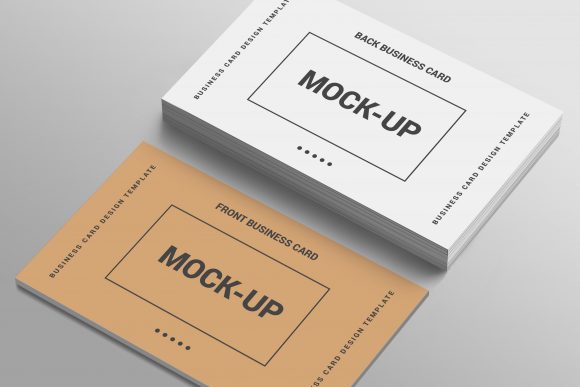
3D Business Card Mockup Template-2: A Practical Guide for Real-World Designers
In the world of branding and graphic design, presentation is everything. You might have spent weeks perfecting a logo or crafting the perfect typography for a business card, but if you present it as a flat, two-dimensional image on a white background, it often fails to communicate its true potential. This is where 3D Business Card Mockup Template-2 comes into play. It is not just a visual aid; it is a critical tool that bridges the gap between a digital file and a tangible product.
This specific mockup template is designed for professionals who need to showcase their work in a realistic, three-dimensional context without needing expensive photography equipment or complex 3D modeling skills. By using this resource, designers, entrepreneurs, and marketers can create high-quality presentations that help clients visualize the final product before it is ever printed.
Why Presentation Matters More Than Ever
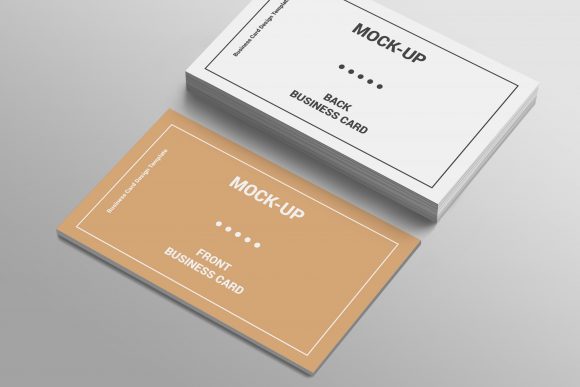
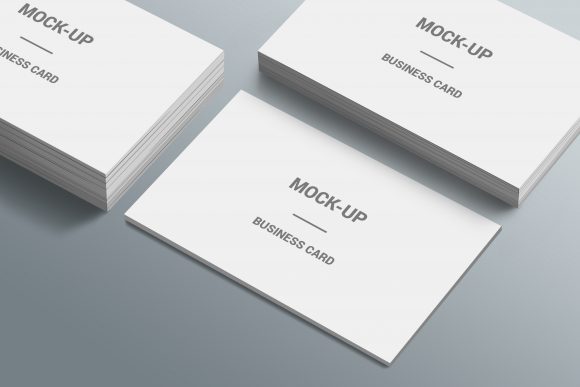
Consider the scenario of a freelance graphic designer pitching a rebranding package to a small business owner. The client cares less about the technical specifications of the vector files and more about how the brand will look in their hands. A flat JPEG of a business card feels abstract. However, a 3D mockup that shows the card resting on a desk, slightly angled with realistic shadows and lighting, feels immediate and real.
3D Business Card Mockup Template-2 addresses this psychological need for realism. It allows users to demonstrate texture, finish, and scale. When a client sees a mockup that mimics the way light hits a matte finish or reflects off a glossy surface, they are more likely to approve the design because they can "see" the physical object. This reduces revision rounds and builds confidence in the designer’s expertise.
Understanding the Technical Advantages
The effectiveness of any mockup lies in its usability. If a template is difficult to edit, even the best-looking result is useless. 3D Business Card Mockup Template-2 is built around a single Photoshop PSD file, which is the industry standard for flexible design workflows. The core feature that makes this template stand out is its use of Smart Objects.
For those unfamiliar with the term, a Smart Object is a layer that contains image data from raster or vector images. In practical terms, this means you can drop your own design into the mockup, and it will automatically conform to the perspective and lighting of the scene. You do not need to manually warp, distort, or mask your artwork. This saves hours of tedious editing time and ensures that the final output looks professional and seamless.
- Easy Edit in Smart Object: Simply double-click the Smart Object layer, paste your design, save, and watch it update instantly on the card.
- Fully Organized Layers: The file structure is clean, making it easy to locate specific elements like shadows, highlights, or the card itself if you need to make advanced adjustments.
- New Style Mockup Design: The aesthetic is modern and versatile, fitting well with both corporate and creative portfolios.
Changeable Backgrounds: Adapting to Any Context
One of the most powerful features of this template is the ability to change the background. In marketing, context is king. A business card presented on a sleek, dark marble surface conveys luxury and sophistication, suitable for a law firm or a high-end restaurant. The same card presented on a textured, light wood desk suggests approachability, creativity, and warmth, ideal for a startup or a boutique agency.
The PSD Background Editable feature allows you to swap out the environment to match the brand identity you are showcasing. This flexibility is crucial for social media content creation. For instance, a blogger or educator might need different backgrounds for different posts—one for a professional LinkedIn update and another for a casual Instagram story. Instead of creating multiple mockups from scratch, you can simply toggle the background layer, saving significant time while maintaining variety in your content.
Real-World Use Cases Across Industries
While business cards are traditionally associated with networking, the applications of 3D Business Card Mockup Template-2 extend far beyond simple contact information exchanges. Here is how different users can leverage this tool in their daily work.
Freelancers and Creative Agencies
For freelancers, the portfolio is the primary sales tool. Using this mockup allows you to include business card designs in your case studies alongside other deliverables like logos and packaging. It demonstrates attention to detail and an understanding of print production. When presenting to a client, showing the card in a 3D context helps justify the value of your design services, as it elevates the perceived quality of the work.
Small Business Owners and Entrepreneurs
Not every entrepreneur is a graphic designer, but many need to preview their branding materials. Before spending money on printing hundreds of cards, a business owner can use this template to visualize how their logo and color palette look together. It acts as a low-cost proofing stage. If the colors clash or the text is too small in the mockup, it is much cheaper to fix it digitally than to reprint physical cards.
Marketing and Social Media Managers
In the age of digital marketing, business cards often exist only in screenshots and emails. Marketers can use this mockup to create engaging visual content for campaigns. Imagine a "Meet the Team" post where each team member’s digital business card is displayed in a stylish 3D arrangement. Or consider a promotional campaign for a new service launch, where the call-to-action is embedded on a beautifully rendered card. These visuals stop the scroll and encourage engagement.
Educators and Students
In educational settings, particularly in graphic design courses, students learn the importance of presentation. 3D Business Card Mockup Template-2 serves as an excellent teaching aid. It allows students to focus on the design principles rather than getting bogged down in the technicalities of 3D rendering software. Educators can use it to grade projects based on how well the design integrates with the medium.
What to Consider Before You Start
While this template is user-friendly, there are a few practical considerations to keep in mind to get the best results. First, always ensure your source design is high-resolution. Since the mockup simulates a physical object, low-resolution images will appear pixelated and unprofessional when scaled up. Aim for at least 300 DPI (dots per inch) for print-ready outputs.
Secondly, pay attention to the safe zones and bleed areas of your design. Even though the Smart Object handles the perspective, it cannot correct a design that has important text cut off by the edge of the card. Always leave enough padding around your logo and contact information.
Finally, consider the color profile. Screens display colors in RGB, while printed cards use CMYK. There is often a slight difference in vibrancy. Use the mockup as a guide for composition and layout, but remember that the final printed colors may vary slightly due to the limitations of screen color representation.
Conclusion
3D Business Card Mockup Template-2 is more than just a pretty picture; it is a functional asset that enhances communication between designers and clients. By offering easy editing through Smart Objects, customizable backgrounds, and a fully organized layer structure, it streamlines the workflow for creators across various fields. Whether you are a seasoned pro looking to polish your portfolio or a small business owner trying to visualize your brand, this tool provides a realistic, professional, and efficient way to present your ideas. In a competitive market, the ability to show, not just tell, can make all the difference in securing trust and closing deals.